Home
Zoho Solutions
🔷 Zoho One 📑 Zoho Books 🎯 Zoho CRM 📊 Zoho Analytics 📦 Zoho Inventory 💰 Zoho Payroll ⚙️ Business Automation
Indian Compliance
🧾 GST Compliance 📋 Income Tax 🇮🇳 TDS & Other Compliance
Global Finance
📈 Virtual CFO 🌐 Offshore CPA
Tools
📊 TDS Rate Finder 🧾 GST Late Fee Calc Soon 📋 Tax Regime Calc Soon
Industries
🤖 Robotics & Leasing 🚀 AI & SaaS Startups
Your Finance Team Case Studies Blog Updates Talk to an Expert
🎯 Zoho CRM📊 Pipeline Automation✅ Approval Workflows📈 KPI Dashboards

Your CRM pipeline should be
a financial instrument. Not a contact book.

If your deal amounts are manually entered, your stage names came from a template and commission disputes happen every month end, your Zoho CRM is installed but not configured. We fix that.

Pipeline numbers nobody trusts

📊

Deal amounts are guesses

Sales rep creates a quote, then manually types a different number into the deal. Quote gets revised, deal stays at the old figure. The pipeline report is fiction and the CFO cannot use it for decisions.

🎭

Stage names mean nothing

Qualification at 20%. Proposal at 60%. These are Zoho defaults with no relationship to your actual win rates. Weighted pipeline is therefore also wrong.

🧮

Commission is a monthly argument

Calculated in a spreadsheet by someone without complete data. Salesperson has a different number. The conversation every month end that nobody wants to have.

Custom stages that reflect how you actually sell

Based on the client implementation, we configured eight stages with calibrated probabilities matching real win rates at each stage. Each stage triggers specific actions automatically.

Discovery
20%
Proposal
30%
Demo / Pilot
60%
Demo Success
70%
Contract Negotiations
80%
Procurement / Legal
90%
Closed Won
100%
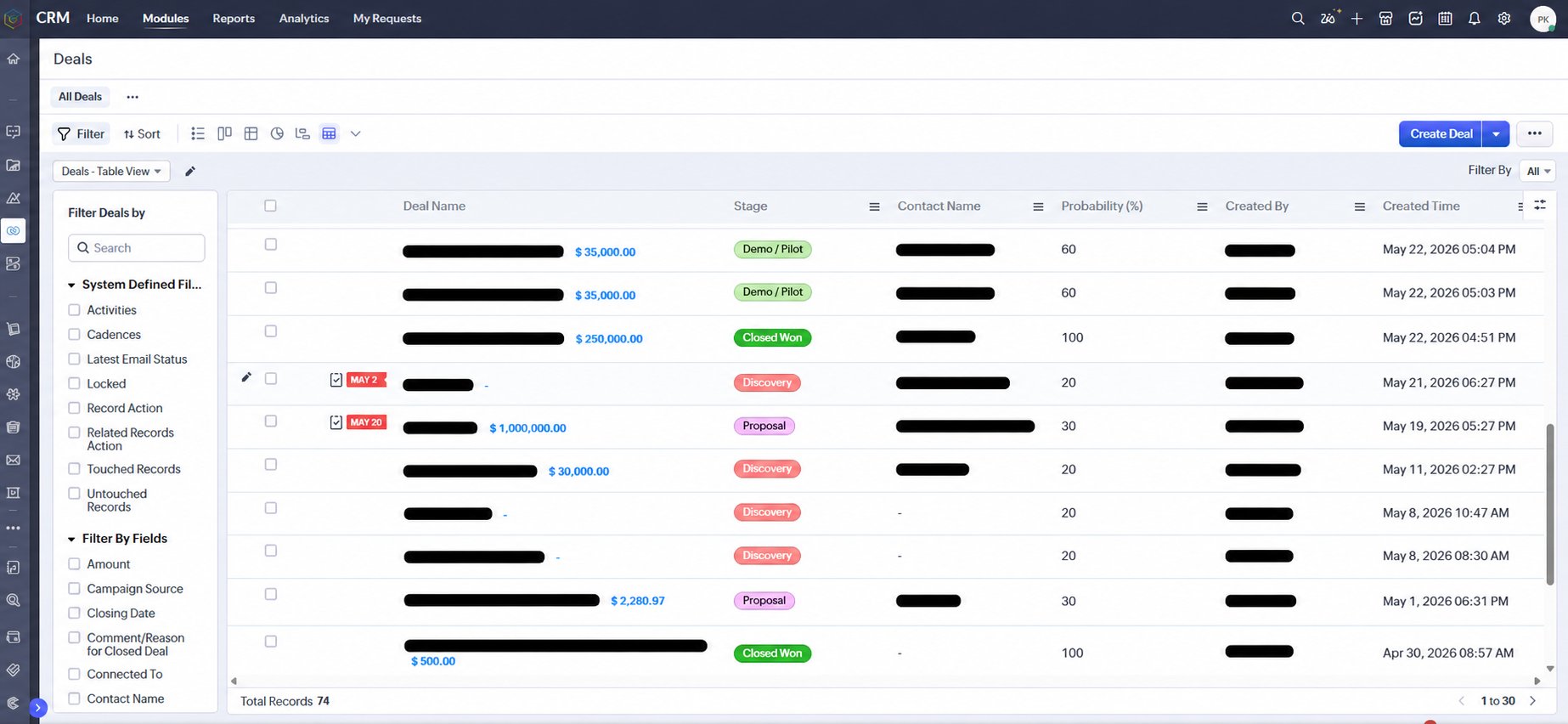
Zoho CRM deal pipeline with custom stages and probability
Live CRM pipeline showing Discovery, Proposal, Demo/Pilot and Closed Won stages with deal values
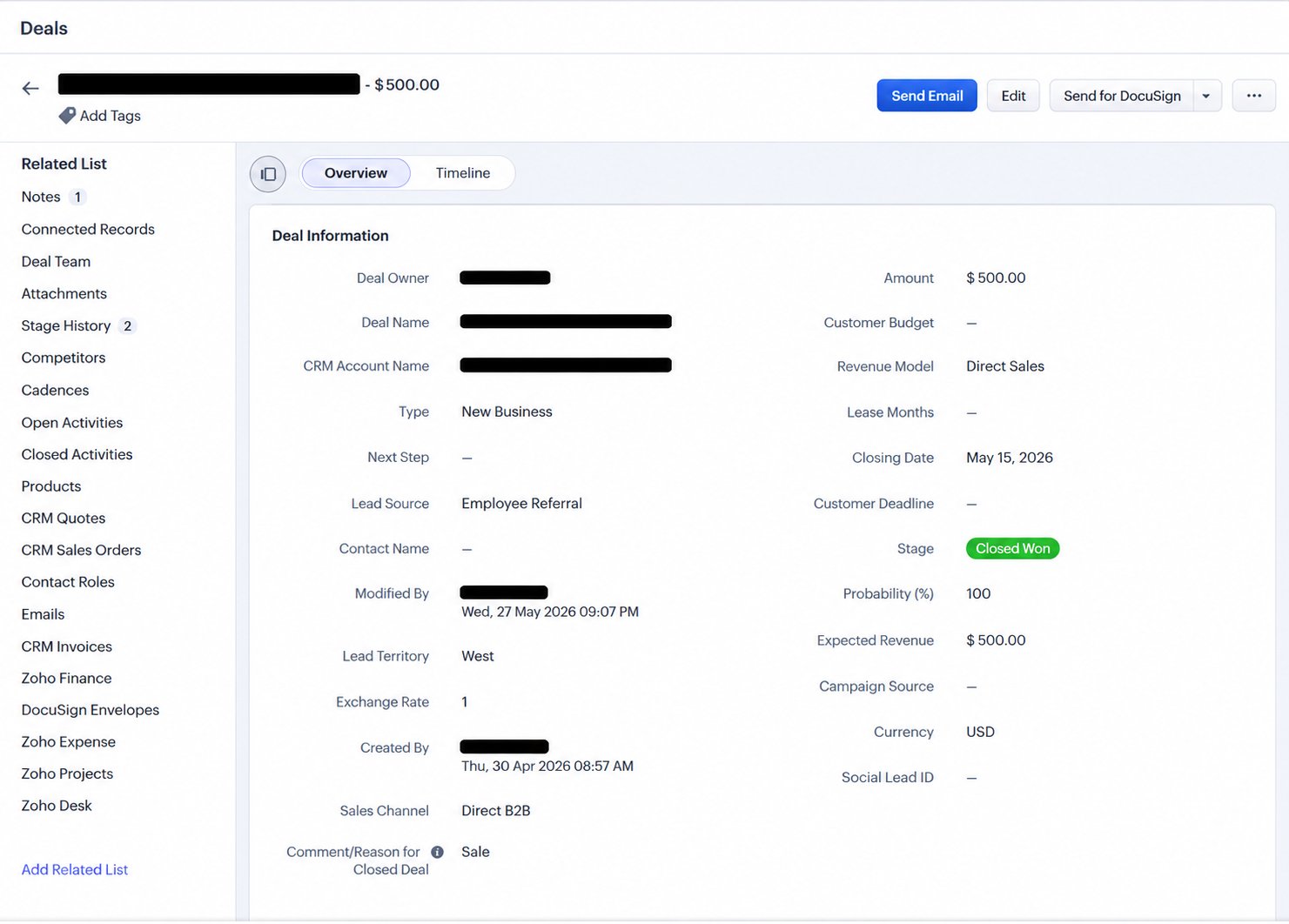
Zoho CRM deal record with custom fields
Deal record showing Revenue Model, Closing Date, Customer Deadline, Stage and Sales Channel fields

Deal amount updates automatically when the quote changes

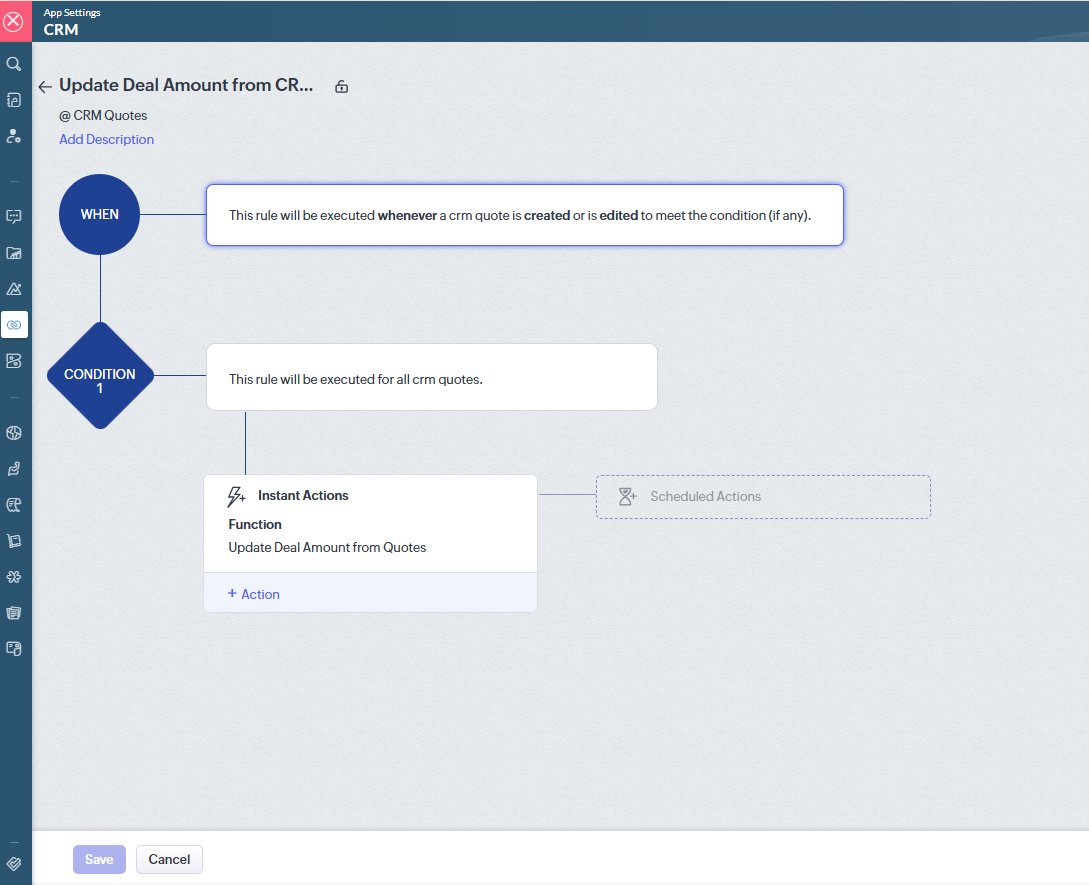
We wrote a Deluge function that fires every time a CRM quote is created or edited. The deal amount field updates automatically from the quote total. Pipeline is always based on real quoted value.

Zoho CRM workflow for updating deal amount from quote
Workflow rule: triggers when CRM quote is created or edited, instantly runs Update Deal Amount function
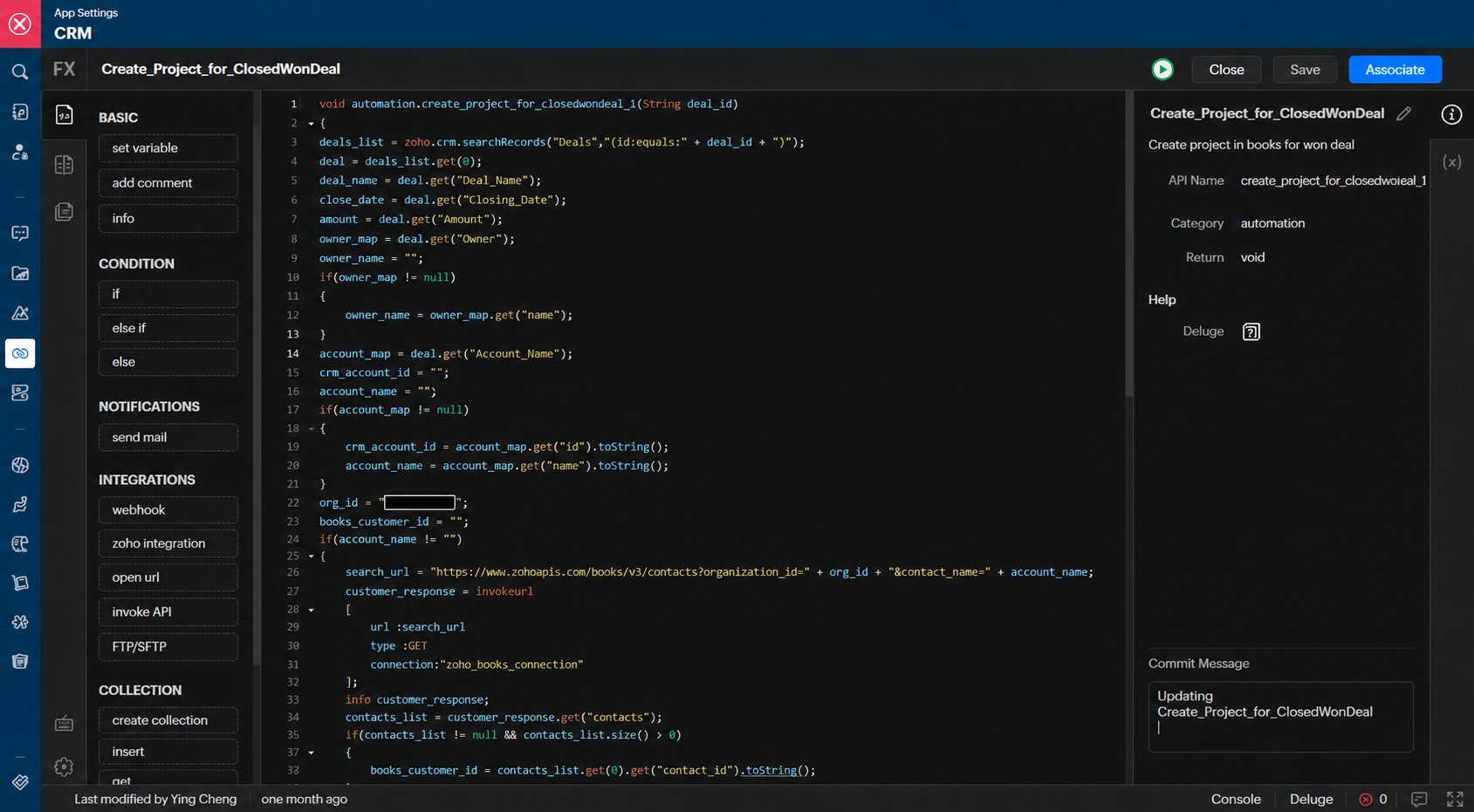
Zoho CRM Deluge code for auto project creation
Custom Deluge function: creates a project in Zoho Books automatically when deal stage moves to Closed Won

What happens automatically when a deal is marked Closed Won

Project auto-created in Zoho Books for expense and income tagging
Accounts Payable team notified to arrange product purchase
AR team notified to prepare for invoicing
Demo/Pilot transfer order triggered if applicable
Big Deal Alert sent if value exceeds threshold
KPI dashboard updated in real time

Every team gets notified at the right moment

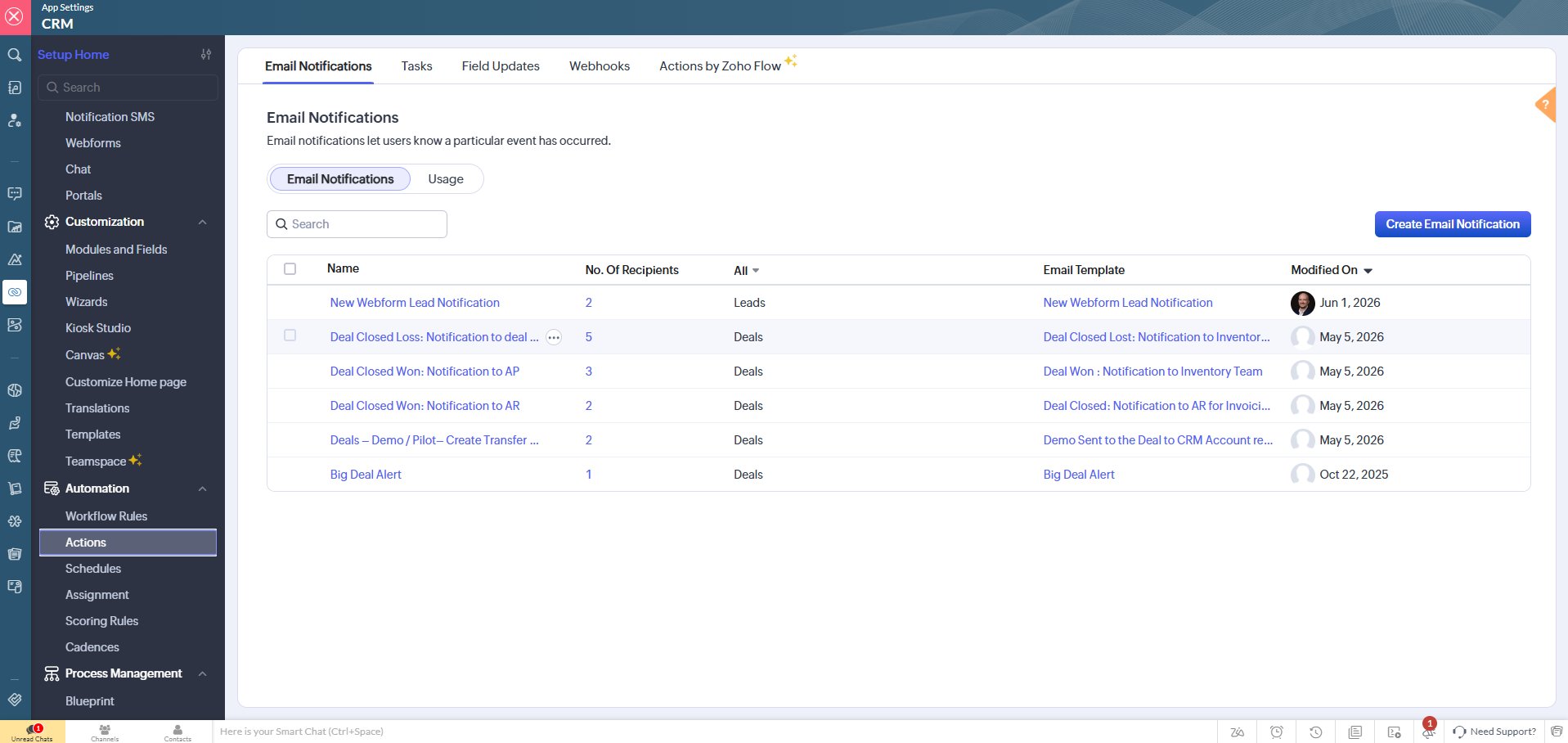
Six automated email notifications configured in CRM. No manual forwarding, no information lost in WhatsApp or Teams threads.

Zoho CRM email notifications list
Automated notifications: Deal Closed Won to AP and AR, Demo/Pilot Transfer, Big Deal Alert, New Lead

Notification triggers configured

Deal Closed Won: AP Notification
3 recipients, includes SOP document attached
Deal Closed Won: AR Notification
2 recipients, AR team alerted for invoice preparation
Demo / Pilot Transfer Order Trigger
2 recipients, inventory team notified for transfer
Deal Closed Lost: Notification
5 recipients, lost deal reason captured and circulated

Every salesperson accountable to numbers they can see

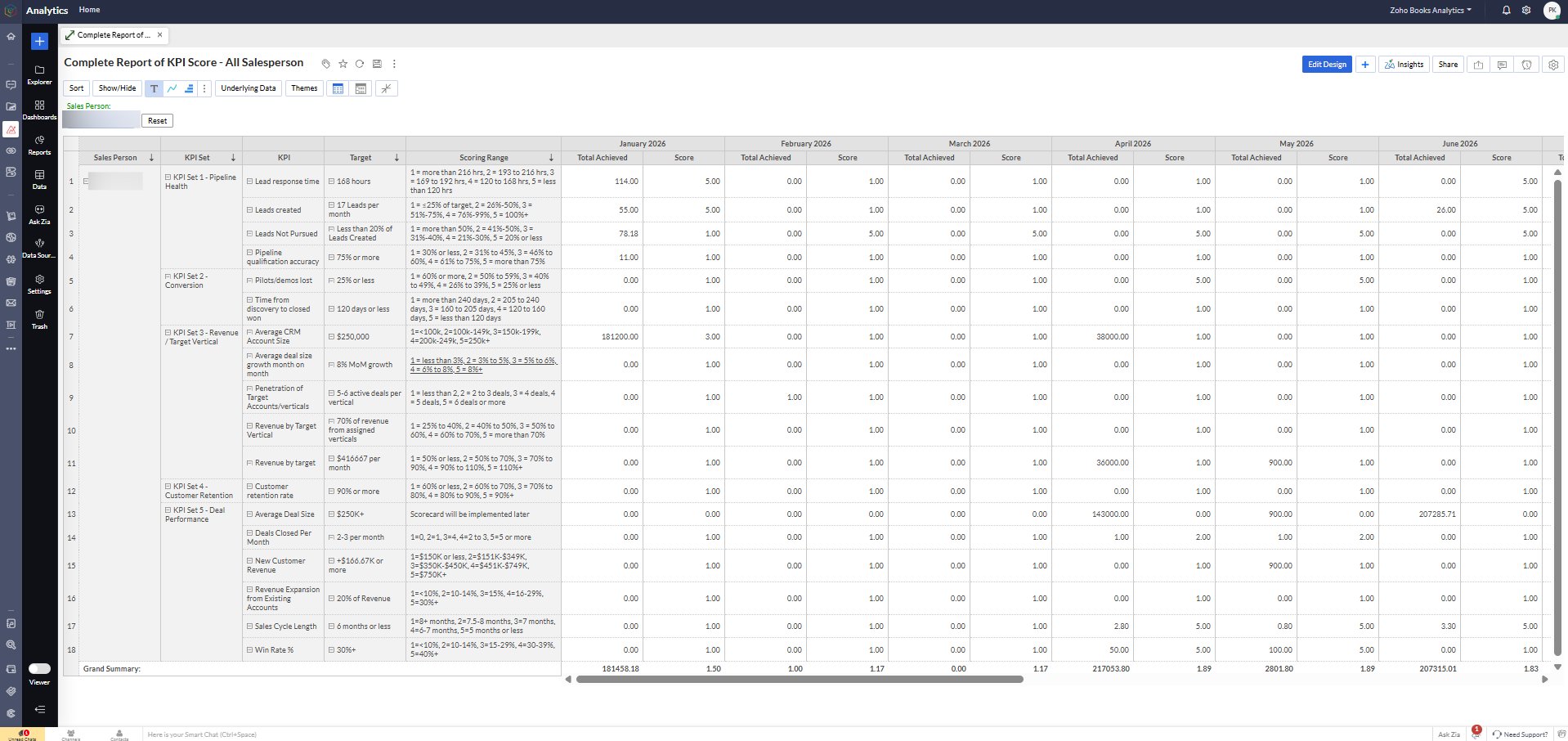
Complete KPI score for all salespersons across five KPI sets: Pipeline Health, Conversion, Revenue by Vertical, Customer Retention and Deal Performance. Scored monthly, automatically.

Zoho Analytics KPI Score dashboard for all salespersons
Complete KPI Score report showing Lead Response Time, Leads Created, Pipeline Accuracy, Pilots/Demos, Revenue by Target Vertical and Deal Performance scoring
KPI Set 1
Pipeline Health
Lead response time, leads created, leads not pursued, pipeline qualification accuracy
KPI Set 2
Conversion
Pilots and demos lost, time from discovery to close, conversion rate targets
KPI Set 3
Revenue by Vertical
Average CRM account size, deal size growth, penetration of target verticals, revenue vs target

No shipment or invoice before all approvals complete

Every sale goes through a structured approval hierarchy. Sales cannot approve their own deals. Inventory cannot be allocated before finance approval. This is enforced in the system, not just policy.

1️⃣

Sales Initiation

Salesperson creates deal, quote and marks Ready for Approval. Cannot approve own deal.

2️⃣

Sales Operations

Verifies customer details, product model, serial availability, delivery address and contract attached.

3️⃣

Finance Approval

Reviews pricing and margin, payment terms, credit risk, advance requirement and tax treatment.

Operations Proceed

Only after all approvals: Sales Order, inventory allocation, shipment scheduling and invoice creation.

Is your CRM pipeline accurate right now?

If you are not confident in your deal amounts or stage probabilities, we should talk.