Home
Zoho Solutions
🔷 Zoho One 📑 Zoho Books 🎯 Zoho CRM 📊 Zoho Analytics 📦 Zoho Inventory 💰 Zoho Payroll ⚙️ Business Automation
Indian Compliance
🧾 GST Compliance 📋 Income Tax 🇮🇳 TDS & Other Compliance
Global Finance
📈 Virtual CFO 🌐 Offshore CPA
Tools
📊 TDS Rate Finder 🧾 GST Late Fee Calc Soon 📋 Tax Regime Calc Soon
Industries
🤖 Robotics & Leasing 🚀 AI & SaaS Startups
Your Finance Team Case Studies Blog Updates Talk to an Expert
๐Ÿ“’ Zoho Books๐Ÿงพ GST Setup๐Ÿฆ Bank Reconciliationโœ… Approval Workflows

Your books should reconcile
themselves. Almost.

If bank reconciliation takes days, invoices are missed and vendor payments need WhatsApp or Teams approvals to proceed, Zoho Books is installed but not configured. Here is what a proper setup looks like.

You have Zoho Books. You do not have a working setup.

๐Ÿฆ

Bank reconciliation takes days

Hundreds of transactions, most unmatched. Someone spends two days every month going through them manually. Errors carried forward because nobody has time to fix them properly.

๐Ÿ’ฐ

Vendor payments have no audit trail

Payment requested on WhatsApp or Teams, approved informally, posted without a clear record of who authorised what. When the auditor asks, nobody can show the approval chain.

๐Ÿ“ค

Invoices raised late or missed

Recurring clients invoiced fresh every month by someone checking a spreadsheet. Sometimes forgotten. Sometimes wrong amount. Revenue leaks quietly every month.

Every month reconciled. Every period clean.

This is what a properly reconciled bank looks like. Chase Bank, every month from January 2025 through March 2026, all showing Reconciled status. No gaps, no backlog.
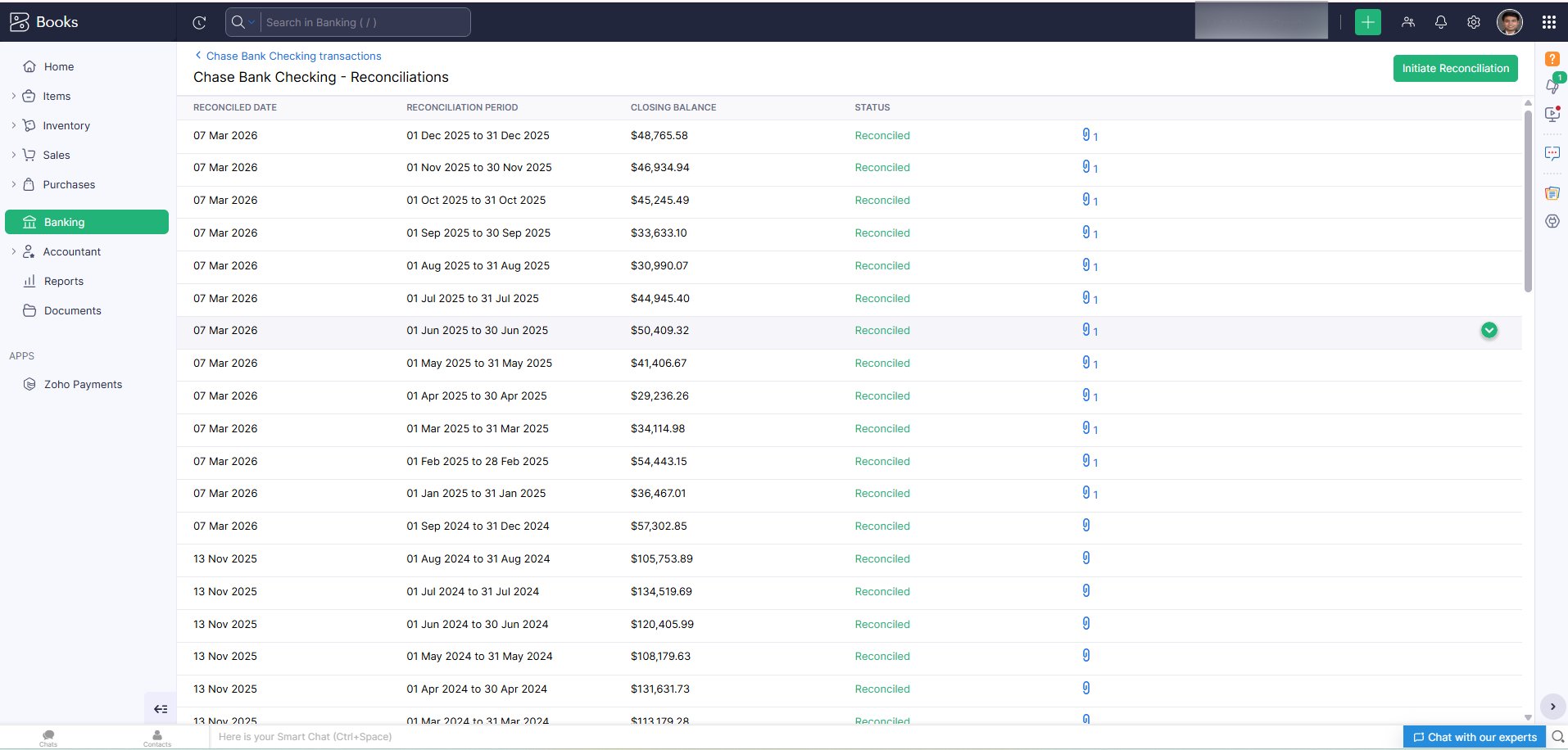
Zoho Books Chase Bank reconciliation history
Chase Bank Checking reconciliation showing every month from Jan 2025 to Mar 2026 as Reconciled with closing balances

Every tax rate configured. Every transaction tagged correctly.

GST tax groups and IGST rates configured in Zoho Books so every invoice, bill and expense carries the correct tax treatment automatically. GSTR-1 and GSTR-3B pull directly from Books data.
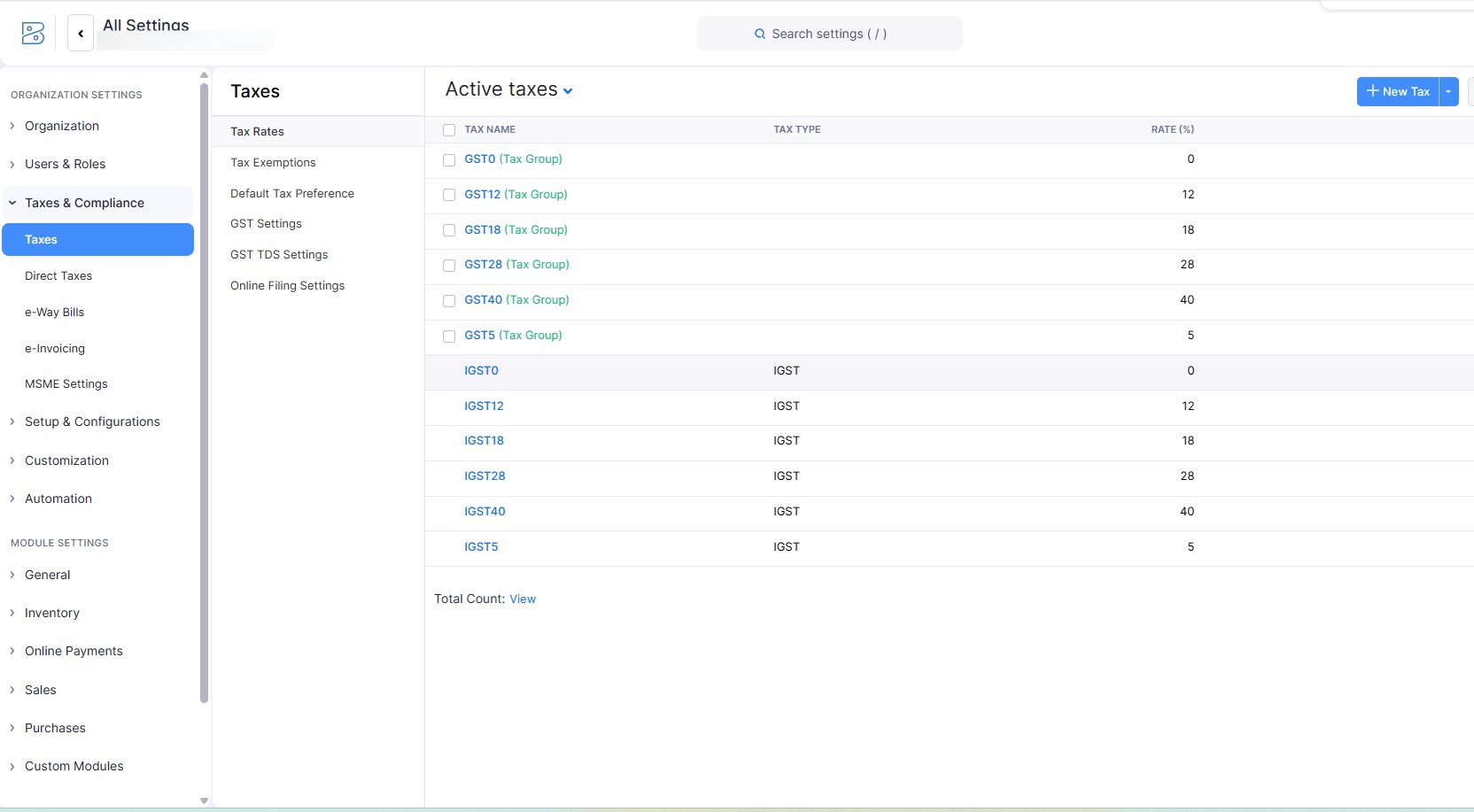
Zoho Books GST tax rates configuration
Tax settings showing GST0, GST5, GST12, GST18, GST28 tax groups and corresponding IGST rates all active and configured

Request, approve and post, three separate people, one system

Default Zoho Books merges approval and posting into one step. We built a custom Vendor Payment Request module that separates the requester, the approver and the payment processor. Payment cannot be posted until all approvers sign off.
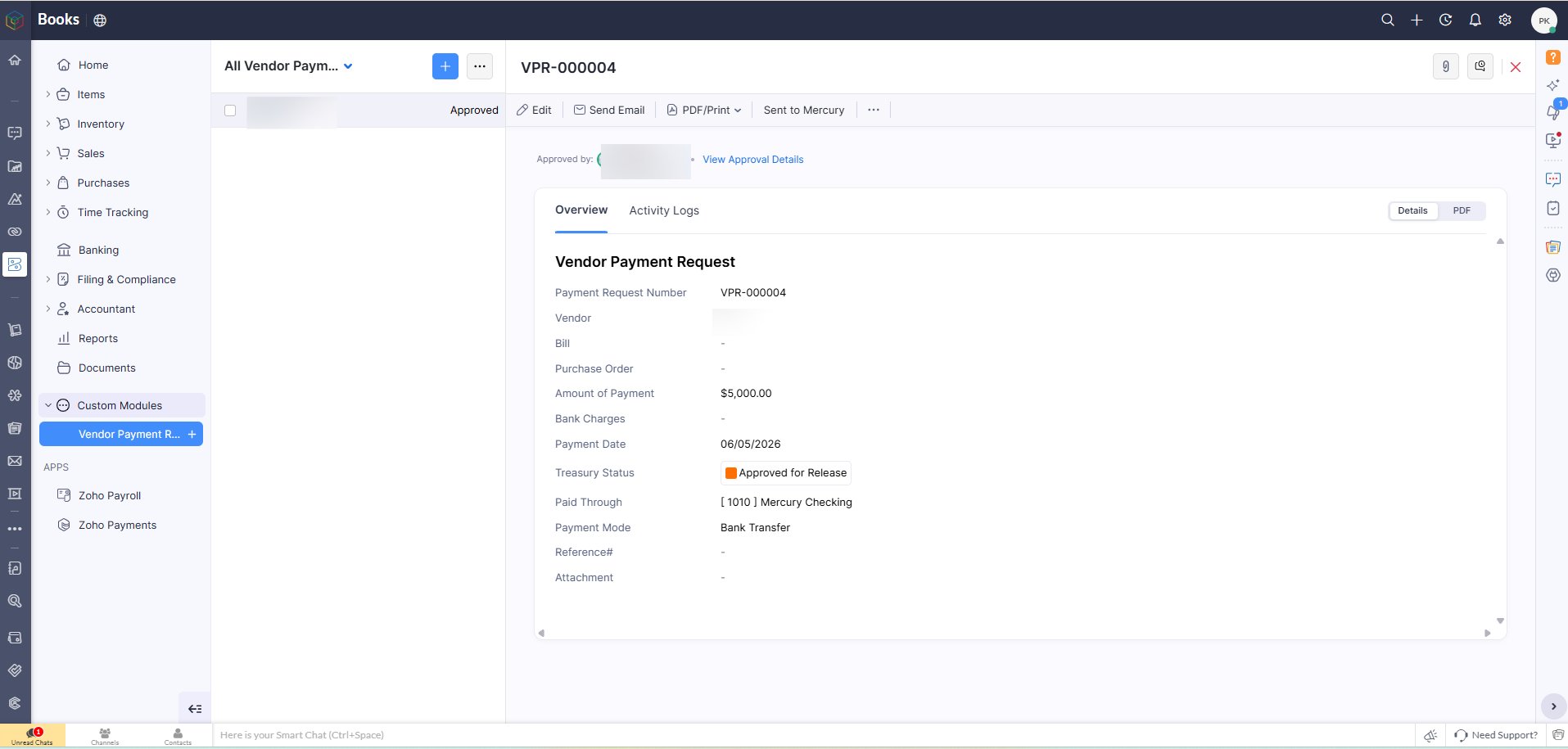
Zoho Books vendor payment request form
VPR-000004 showing Payment Request Number, Amount, Payment Date, Treasury Status as Approved for Release and Payment Mode as Bank Transfer
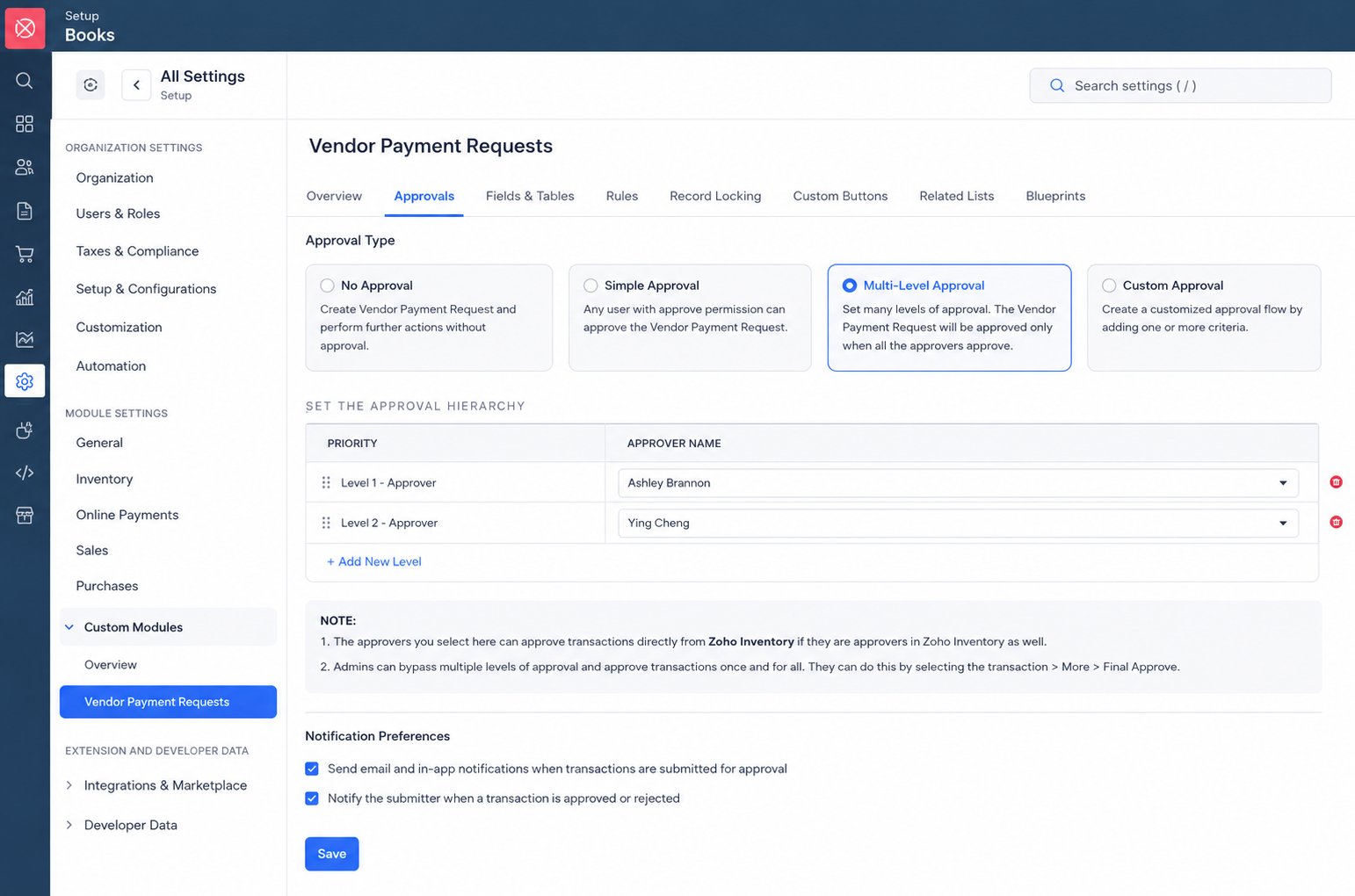
Zoho Books multi-level approval setup for vendor payments
Multi-Level Approval configuration with Level 1 and Level 2 approvers. Payment Request approved only when all approvers confirm.

How the custom vendor payment module works

STEP 1
Requester creates Vendor Payment Request in custom module
STEP 2
Level 1 approver reviews and approves or rejects
STEP 3
Level 2 approver confirms. Custom button appears only when all approved.
STEP 4
Button click auto-posts vendor payment entry to Zoho Books bank ledger

Invoices go out automatically. Reminders follow automatically.

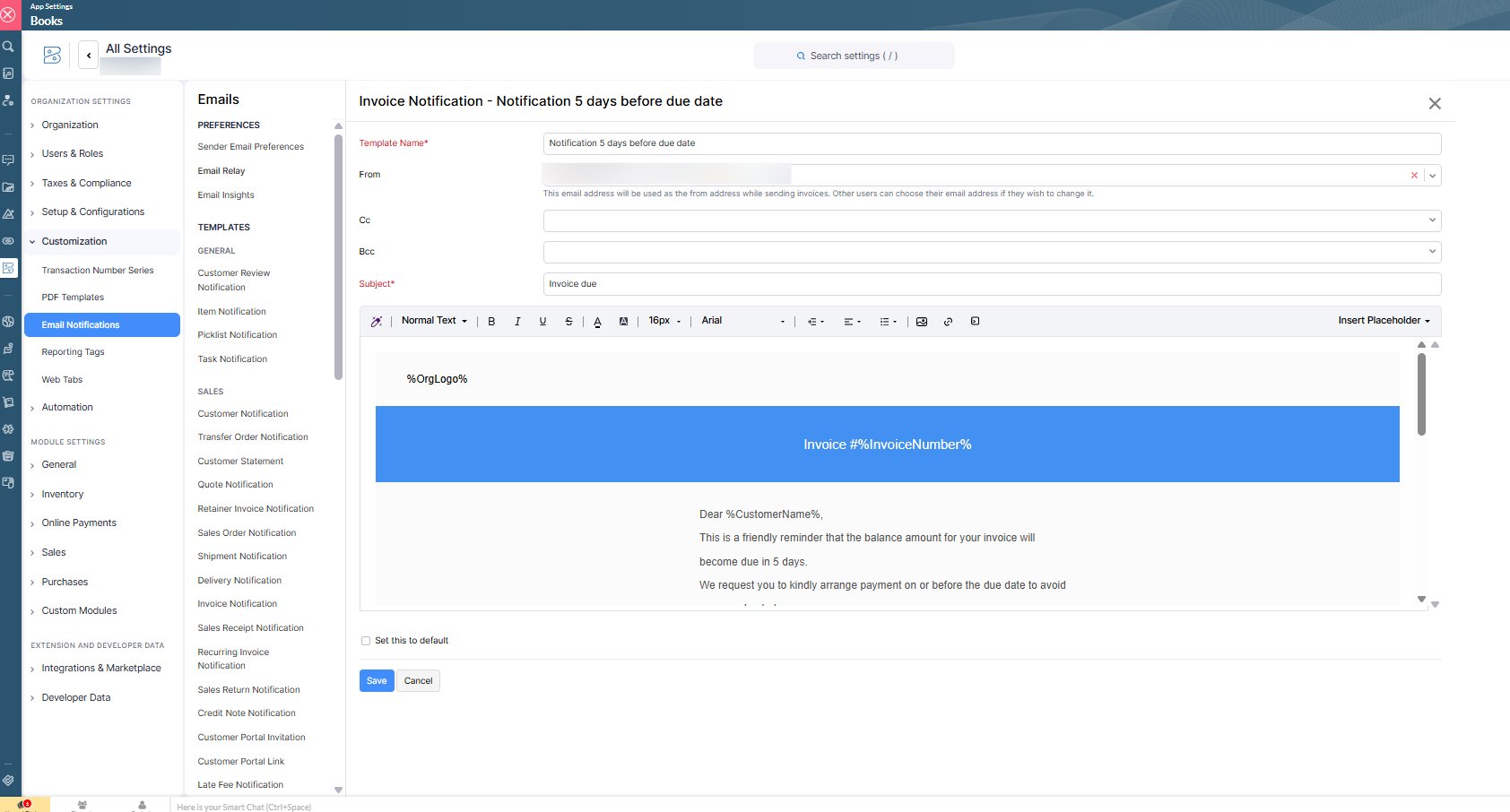
Payment reminder emails configured to send automatically: on invoice creation, 5 days before due date, on the due date and weekly after overdue. AR team notified in advance of upcoming collections.
Zoho Books invoice notification email template
Invoice Notification template showing 5-day advance reminder with invoice number, customer name and due date fields
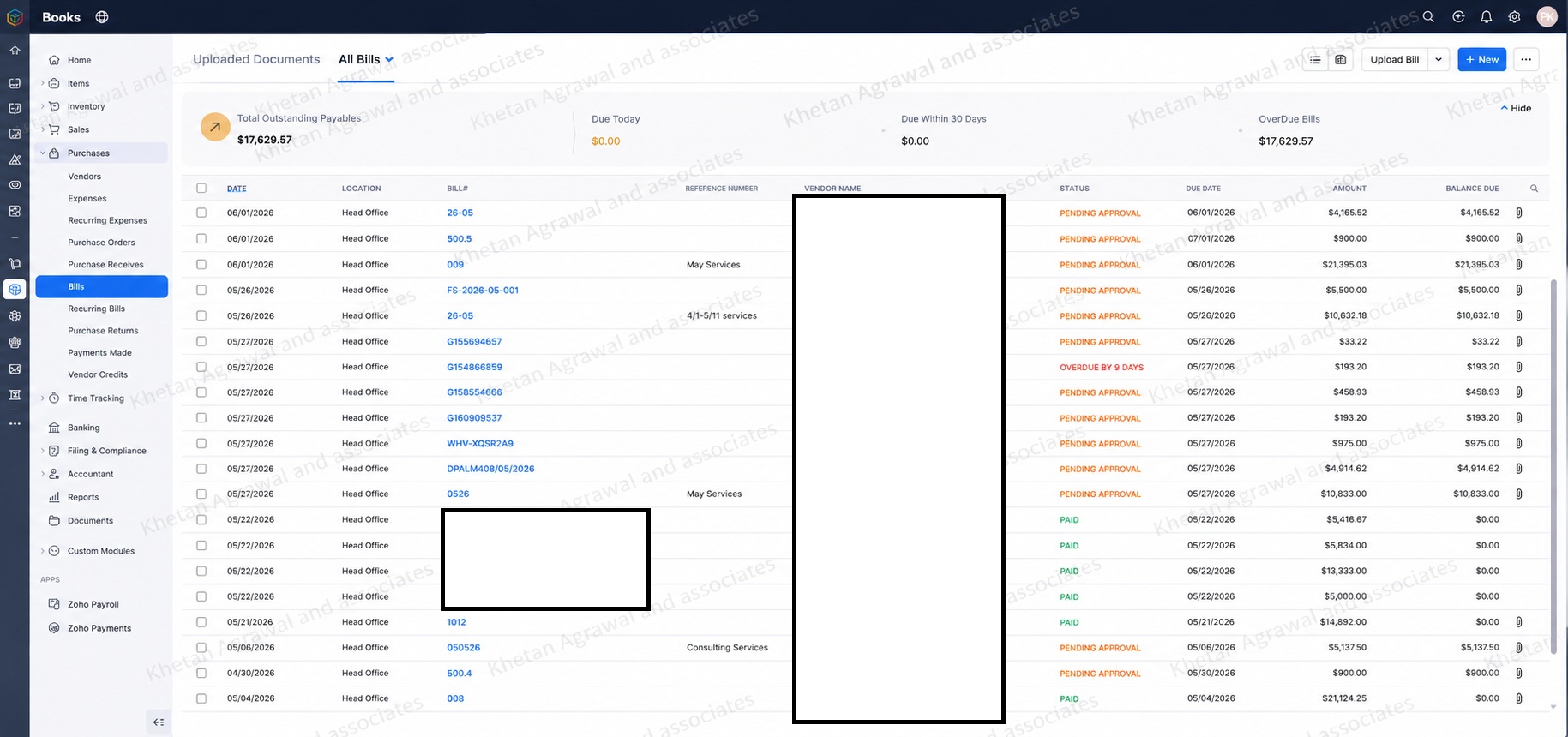
Zoho Books bills dashboard with approval status
Bills dashboard showing Total Outstanding Payables, Due Today, Due Within 30 Days, Overdue Bills with Pending Approval and Paid status per vendor

Our Zoho Books setup process

1

You share Zoho Books access

Read-only credentials so we audit your current setup, chart of accounts, opening balances and configuration.

You provide: Zoho Books admin credentialsPayment processed before we begin
2

We audit and identify gaps

Chart of accounts, tax configuration, bank feeds, opening balances, recurring transactions. Everything documented.

3 to 5 business days
3

Configuration and automation

GST setup, bank rules, recurring invoices, approval workflows, AR automation. Built and tested.

1 to 3 weeks
4

Cleanup and training

Historical cleanup if required, team trained on correct workflows, go-live support.

Included in implementation

When did you last trust your Zoho Books data completely?

If you are not sure, a Zoho Books audit is the right starting point.